


Can you use Alexa as a home alarm?Can you use Alexa as a home alarm?
As a replacement for a home alarm system, Alexa is no good. As a second channel in everyday care — and as a safety net for the moment the alarm button is in the next room — it is surprisingly good.
As a replacement for a home alarm system, Alexa is no good. As a second channel in everyday care — and as a safety net for the moment the alarm button is in the next room — it is surprisingly good.
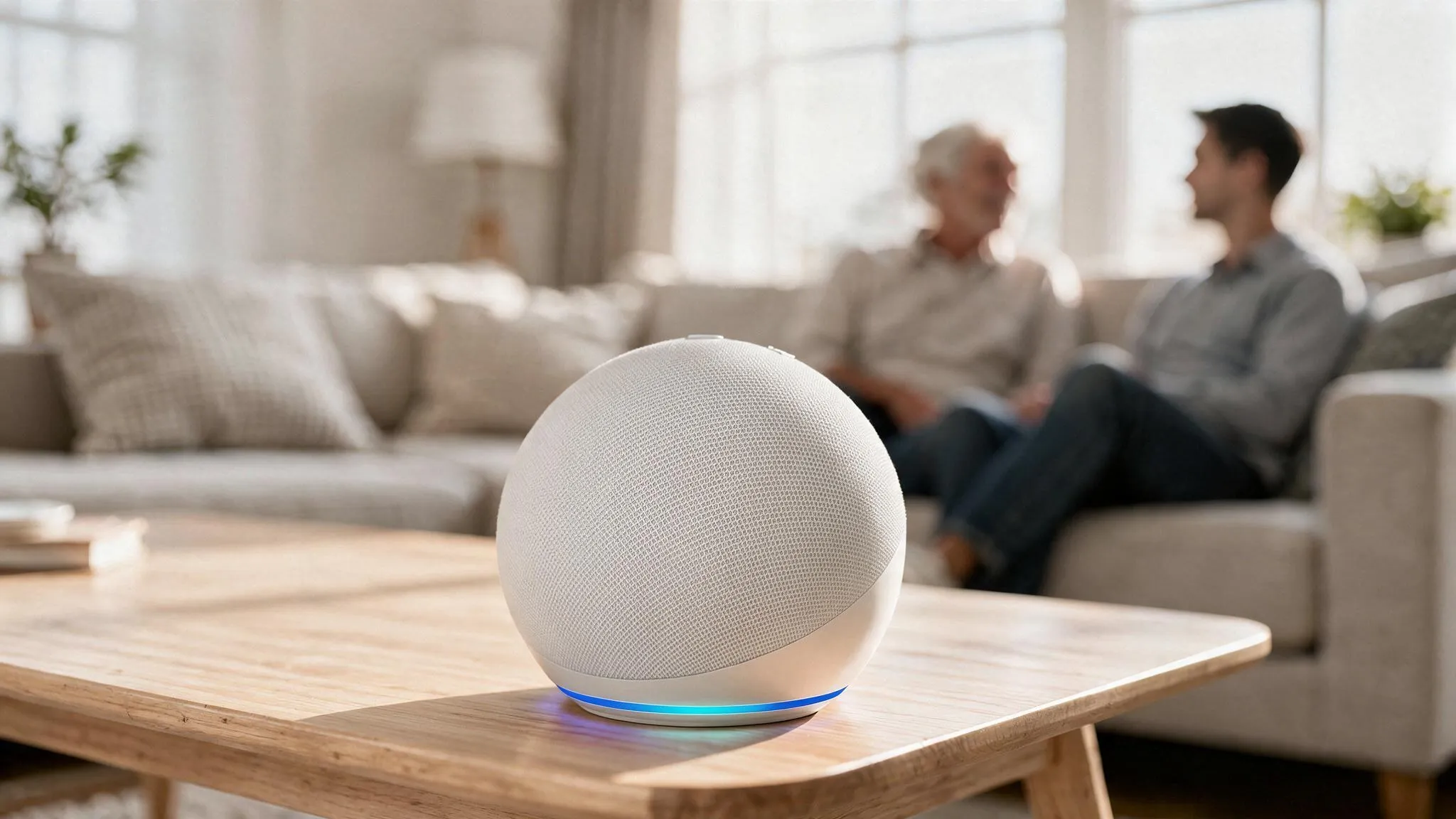
At a glance
- No, not as a replacement. Alexa does not dial the emergency services, has no call centre, no fall detection, and goes down with your Wi-Fi.
- Yes, as a second channel. The person being cared for calls their family’s phone by voice, without picking anything up; the family drops in from their phone onto the Echo in the room — in everyday life just as much as in an emergency, when the alarm button is not on the body.
- One condition: Drop In without a knock only with a clear agreement, and only for one or two people you fully trust.
- Setting it up: four steps. The one everybody forgets is the fourth — the exception to Do Not Disturb. Straight to the instructions.
The question almost always comes up in the same situation. A parent lives alone. There was a fall, or a moment when nobody could be reached. And there is already an Echo in the living room that understands speech and can start calls. So why another device?
The short answer: as a replacement for a home alarm system , Alexa is no good. The longer answer is more interesting: as a second channel in everyday care it is so good that we have been using it for exactly that for years — and as a safety net for the moment the alarm button happens to be lying in the next room.
What Alexa cannot do is quickly told. What it can do deserves the rest of this article.
What Alexa cannot do
A home alarm system is a button on the wrist, a base station with a backup battery and its own SIM card, and a call centre staffed around the clock where a person decides whether to send family, an on-call service or an ambulance. Alexa has none of that:
- No official emergency call. In Germany, Echo devices may dial neither 112 nor 110, and since Echo Connect was discontinued they no longer reach ordinary phone numbers either — only other Alexa users.*
- No call centre. Amazon’s service with staff on duty 24/7, Alexa Emergency Assist, exists only in the US. Here, every Alexa call ends with a family member who may not hear their phone.
- No fall detection. Someone who falls and can no longer speak triggers nothing.
- No power, no internet, no Alexa. If the router goes down, Alexa goes down.
Third-party skills, where “Alexa, start the emergency call” alerts a few stored contacts, widen the circle of people called — but they too notify no ambulance service. That is the whole list. Anyone who needs a home alarm should apply for one; from care level 1 upwards the care insurance fund pays for it as a care aid under Section 40 SGB XI. (Pflegekasse is the German long-term care insurance fund; Pflegegrad is the care level it assigns.)
*One exception: Vodafone customers with the OneNumber option can still call mobile and landline numbers through Alexa.
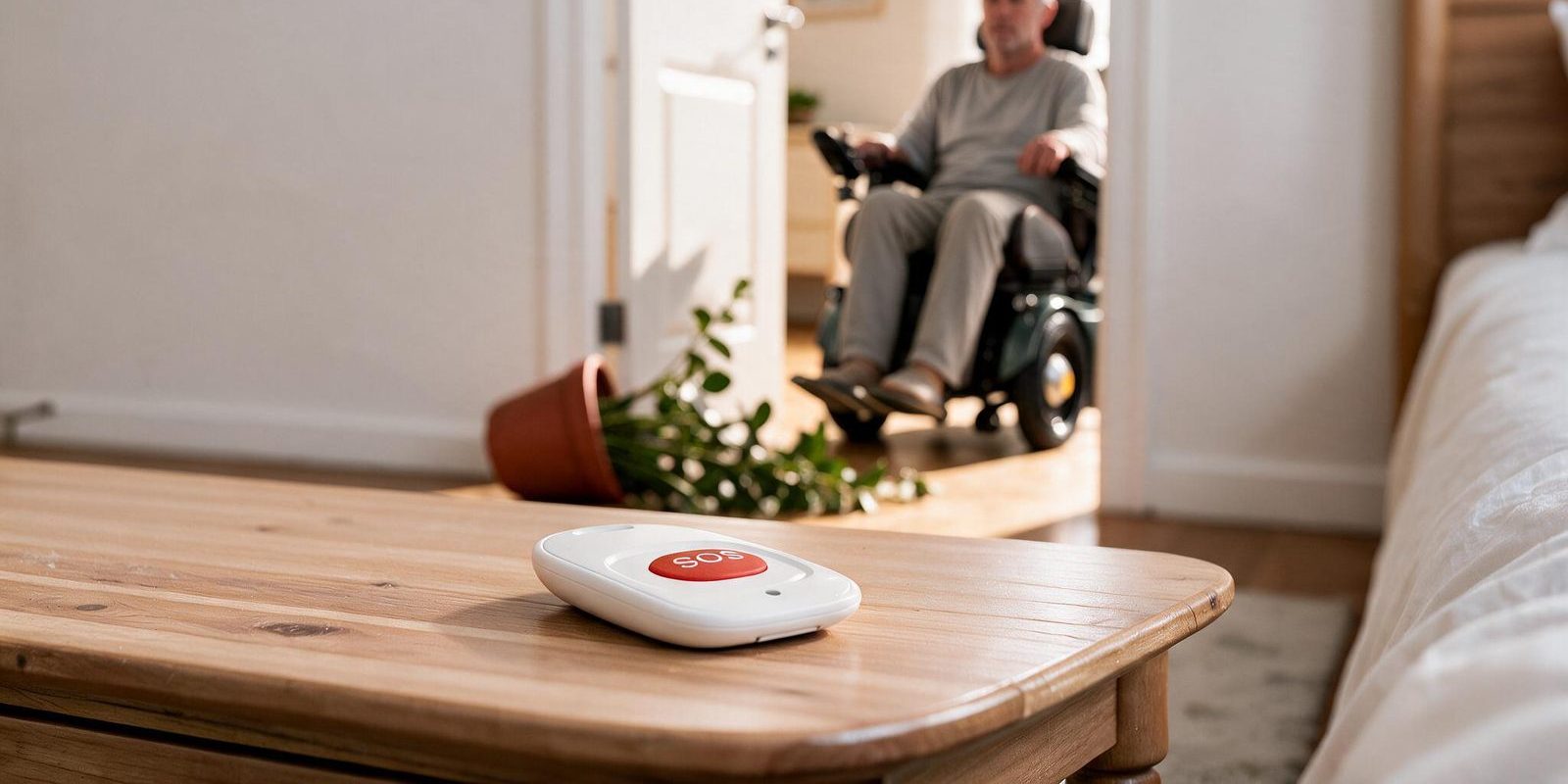
What Alexa is genuinely good at
I have cared for my mother, who has MS, since I was fifteen. In those twenty years I have learnt that everyday care rarely consists of emergencies. It consists of ordinary moments. Of many small questions. Of “could you just help me with this?” And each of those moments has its own small threshold: the phone is in the other room. The hand is too stiff today for the keys. Getting there takes two minutes in a wheelchair, and you do not have two minutes.
Good care is, to a large extent, the work of lowering those thresholds. That is exactly where Alexa is strong — and first of all in the direction that counts.
She can reach me. My mother says out loud that Alexa should call me. That is all. Her Echo starts an ordinary Alexa call: no walk to the phone, no button, no handset to hold. The Alexa app rings on my phone, at night too, even when my phone is silent, because I have made the app an exception to Do Not Disturb. She knows she always reaches me. And because that is no longer a hurdle, she also calls about the small things she used to swallow, back when the phone was too far away. That is the whole point.
I can reach her. The other direction complements it, and it works differently from a technical point of view. Drop In only works onto Echo devices that physically stand in a room, not onto phones. So I start it from the Alexa app on my phone and I am there on her living room Echo, without her having to accept. When I have not heard anything for a while and I am worried, I simply speak into her flat: “Mum, is everything all right?” She has to do nothing. No button, no movement. Even when she is weak she can answer, and I know how things are without her having had to get to the phone first. That lets me stay part of her household even when I am physically somewhere else.
This is not an emergency call. You could call it a soft alarm: the fastest route for everything between “could you help me for a second?” and “I am not feeling well right now”. And because it has no hurdle, it gets used for the everyday things — which incidentally does more against loneliness than any weekend phone call you first have to cross the flat for.
The second safety net
And then there are the moments when it does turn serious. The low-threshold route helps there too, for a reason you only understand once you know how alarm buttons fail.
Alarm buttons have a problem everyone in the trade knows: they are not worn. They lie on the chest of drawers, in the bathroom, in the next room, and when they are needed they are not on the body. On top of that comes a dilemma nobody likes to talk about: the trigger has to be light enough to be operated in an emergency, but stiff enough not to raise a false alarm with every movement. There are moments when the strength for that compromise is simply no longer there.
A voice fails in different places than a thumb. That is precisely why the two complement each other: if the button is in the bathroom but the voice carries, there is still a route. If the voice does not carry but the button is on the wrist, likewise.
Two systems that fail for different reasons are, together, considerably more reliable than either alone. That is the real reason to set Alexa up in a household with care. Not instead of, but as well.
Privacy and trust
Drop In without a knock means this: someone can listen into a flat at any time, unannounced. That is a real intrusion, and it would be dishonest to sell it as a convenience feature.
It works for us because we agreed on three things:
- Only people you fully trust. The permission does not go to “the family” but to one, at most two, named people.
- Always in proportion. Drop In may be a matter of course, but not casual. It is the route for when you want to look in on someone, not the tool for checking every little thing. For everything else there is the ordinary call, which rings and which you are allowed not to answer.
- Both people have to be comfortable with it. Not as a one-off yes, but as a question you calmly ask again now and then. Anyone who feels watched will pull the plug sooner or later. And then the good function is gone too.
The technology does not distinguish between care and surveillance. Only the agreement does.
Checklist: what has to be done on each side
Before the settings, the full list of what is needed: from scratch, sorted by role. With everything ticked off, it works in both directions.
Person being cared for
- An Echo device in the room where they usually are (an Echo Dot is enough; with a display they also see who is calling). Several rooms: several Echos.
- Stable Wi-Fi — where the device actually stands, not just next to the router.
- An Amazon account the device is set up with (their own, or a shared one, see below).
- Communication set up in the Alexa app: phone number verified, contacts synced.
- Drop In switched on at the Echo (step 2).
- Drop In permission granted to the carer (step 3).
- Practised once: “Alexa, call [name].” The name has to be said exactly as it appears in the contact.
Carer
- The Alexa app on the phone, signed in with their own account (or with the shared one).
- Communication set up: phone number verified, contacts synced. The person being cared for has to be in the address book, with the number they gave Alexa.
- The Alexa app made an exception to Do Not Disturb, in every focus mode you use (step 4).
- Alexa app notifications allowed on the lock screen, with sound.
- Tested: a call from their Echo to the phone with Do Not Disturb on, and a Drop In from the phone onto their Echo.
Other contacts (siblings, grandchildren, friends)
- The Alexa app on the phone, with their own Amazon account.
- Communication set up: phone number verified, contacts synced.
- In each other’s address books — on both phones, each with the number registered with Alexa.
- No Drop In permission. Calls ring and can be accepted or declined; that is enough.
- Optional: make the Alexa app an exception to Do Not Disturb, if that person wants to be reachable at night too.
Setting it up in four steps
How to do it technically, you can see here. I use iOS myself, so that is where the screenshots come from — and they show the German version of the apps, with the English meaning in brackets. On Android the settings may look different or sit in other menus.
1. On both sides: account and communication
The person being cared for needs an Echo device set up with an Amazon account, and stable Wi-Fi where the device stands, not just next to the router. The carer needs only the Alexa app on their phone .
Communication has to be set up on both sides: phone number verified, contacts synced. And both have to have each other in their address book, with exactly the number registered with Alexa. Otherwise Alexa will not find the name later.
2. Switch on Drop In at the Echo of the person being cared for
This route runs in the Alexa account of the person being cared for. It allows the device to receive Drop Ins at all. Who gets through is decided only by the next step.
- a)09:41
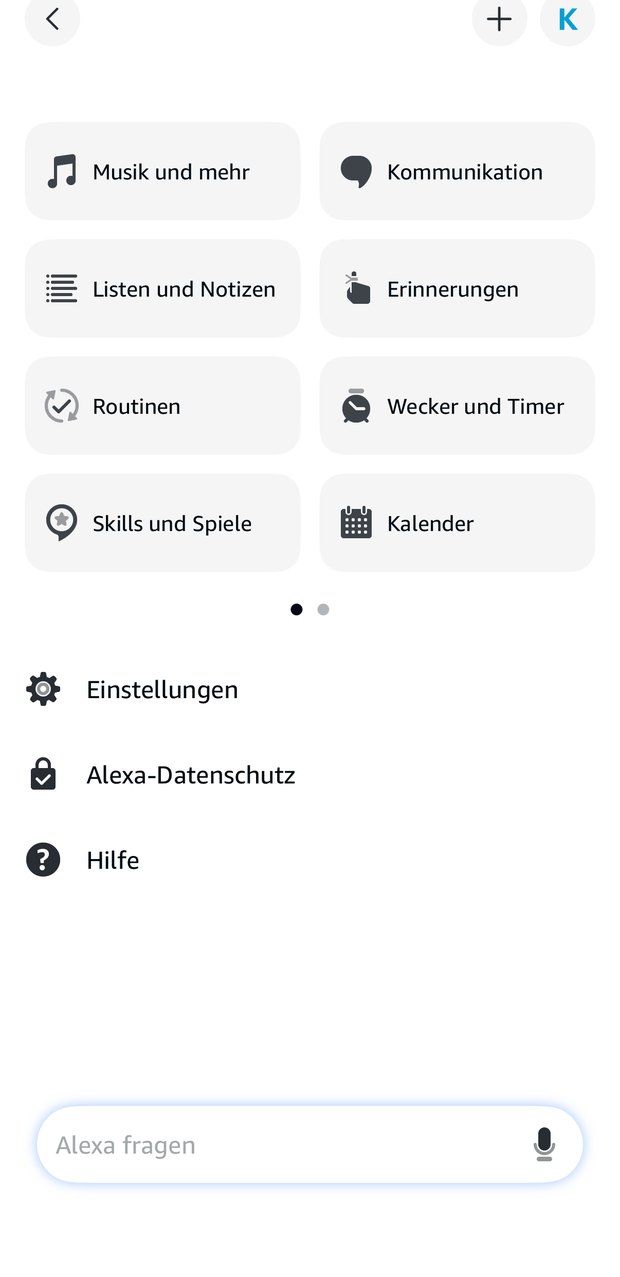
Kommunikation (Communicate)The first time, allow your number and address book.
- b)09:41
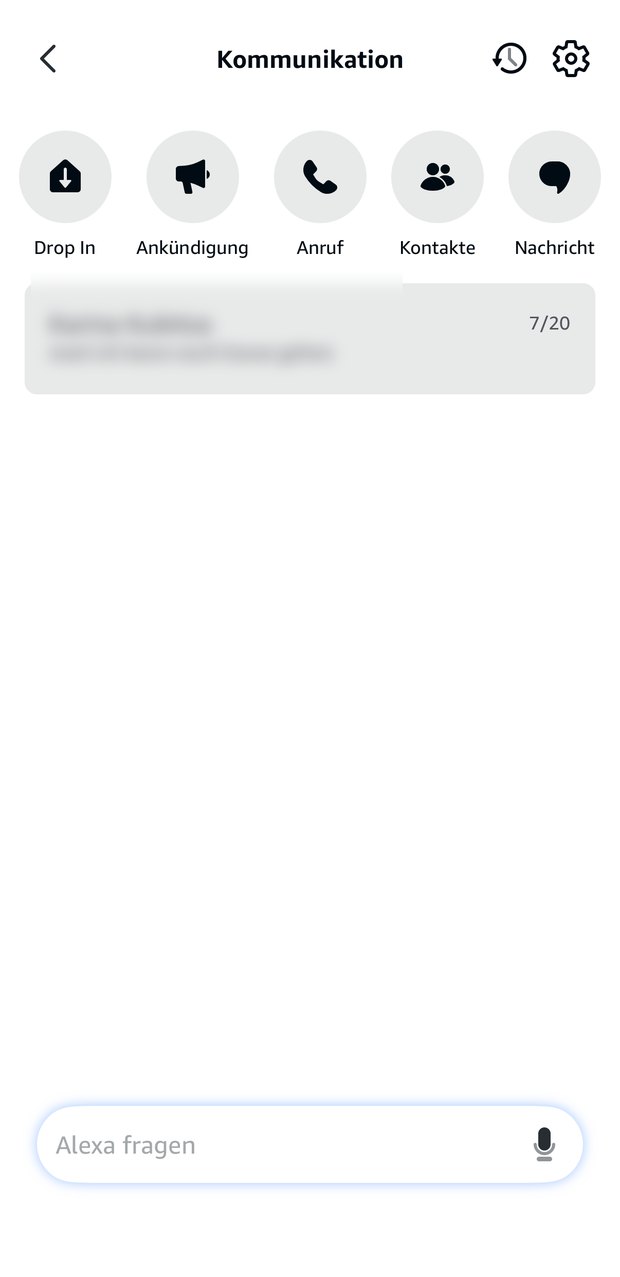
Cogwheel at the top rightThis opens the communication settings.
- c)09:41
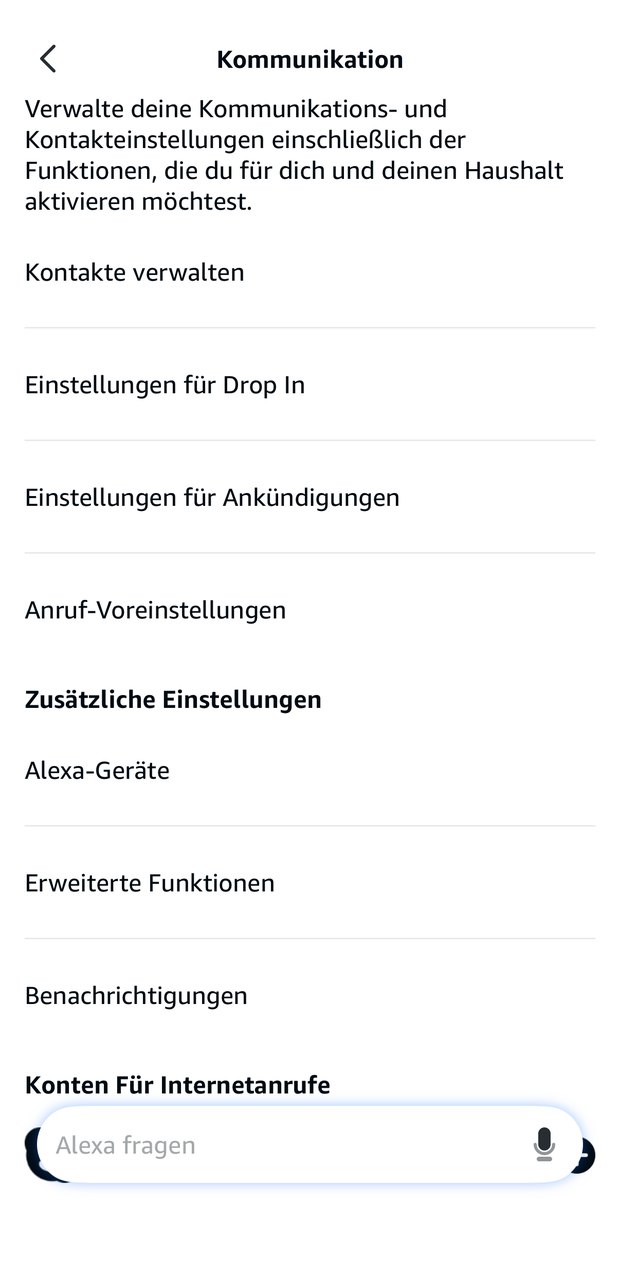
Einstellungen für Drop In (Drop In settings)The second entry — not the announcements.
- d)09:41
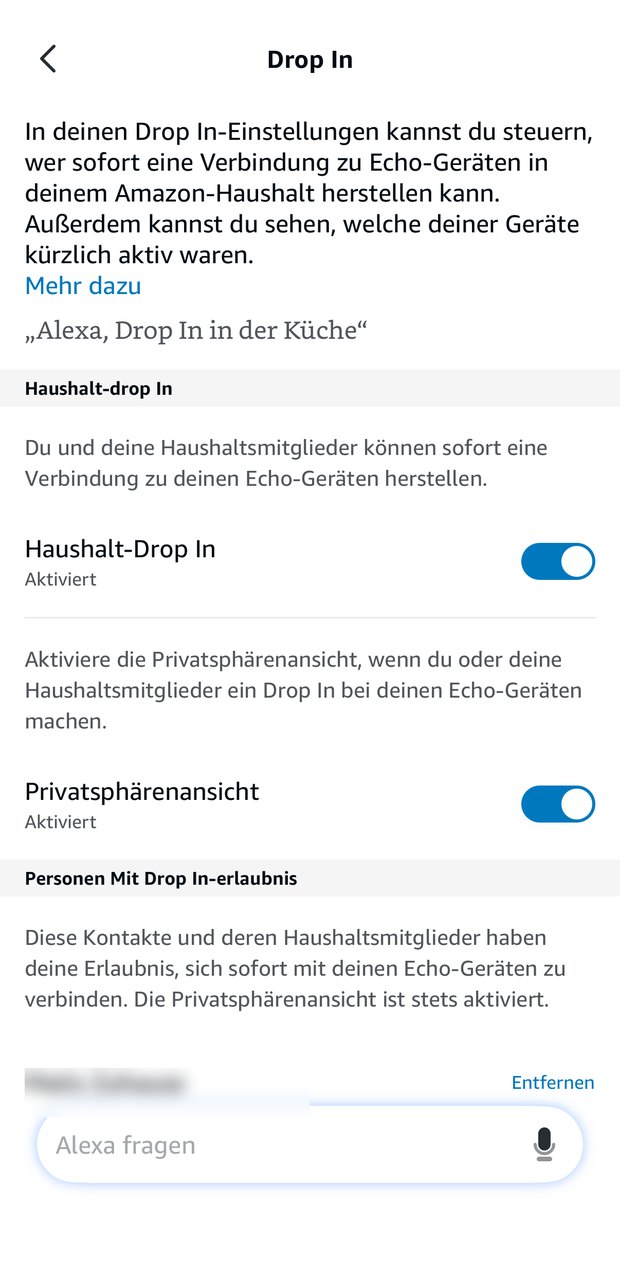
Haushalt-Drop In (household Drop In): switch onThe privacy view below it can stay on.
3. Grant the permission to one person
The decisive step: in the Alexa account of the person being cared for, open the contact of the person they trust and switch on the Drop In permission. That allows exactly this phone to reach their Echo. It happens per person, not across the board, and it can be withdrawn for each person separately. Without that permission nobody gets through, not even with Drop In switched on at the device.
Other contacts such as siblings or grandchildren deliberately do not get this permission. They can call, the Echo rings, and the person being cared for accepts by voice. That is enough.
4. Make the Alexa app an exception to Do Not Disturb
Almost everybody forgets this step, and it decides whether a call at three in the morning arrives. The pictures show an iPhone; on Android the route is Settings → Notifications → Do not disturb → Apps, on Samsung Sounds and vibration → Do not disturb → Apps. Apple describes it under Allow notifications for a Focus.
- a)09:41
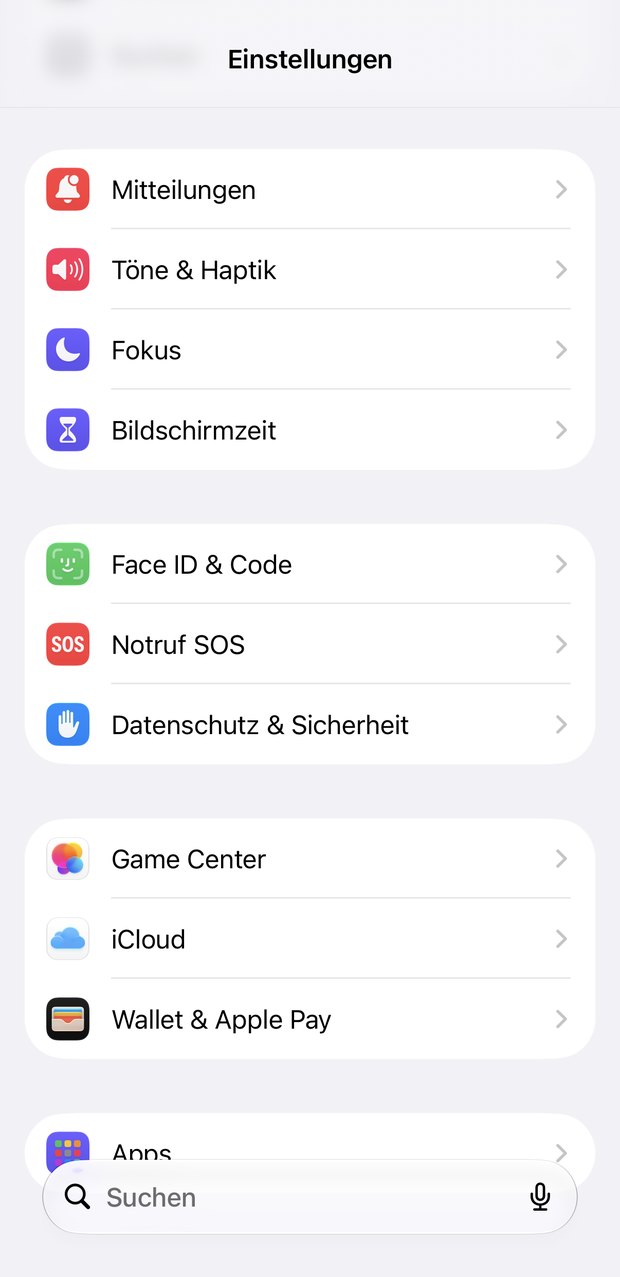
Fokus (Focus)In the iPhone settings, third row.
- b)09:41
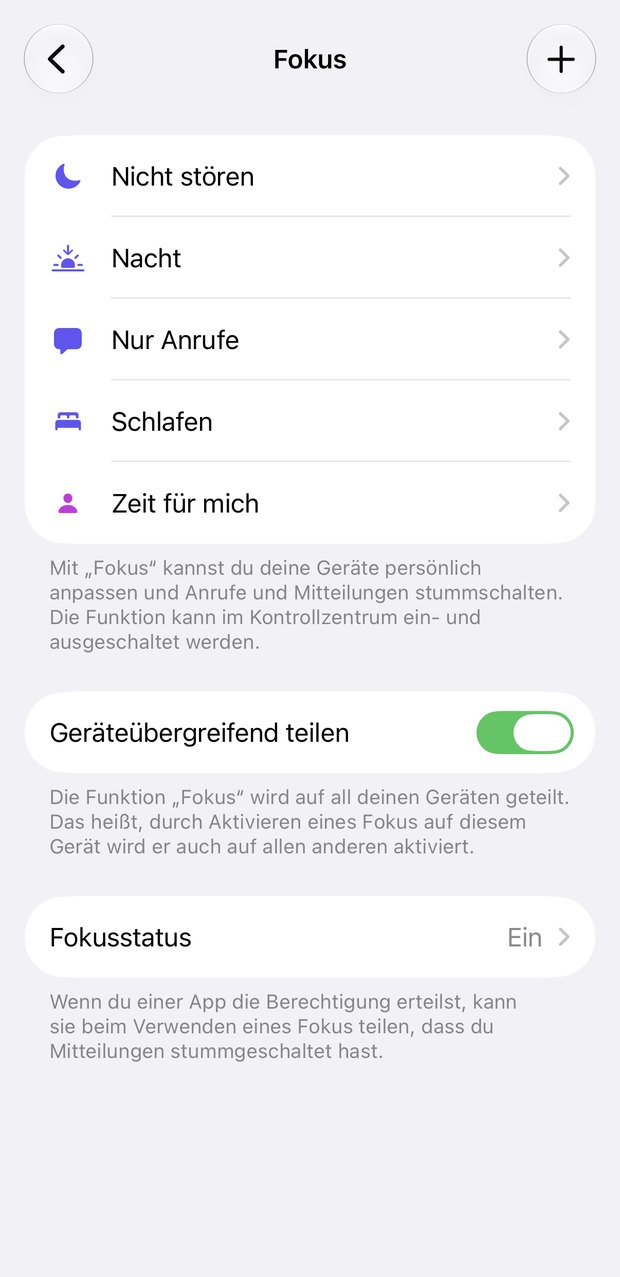
Nicht stören (Do Not Disturb)Do the same for other modes such as Sleep.
- c)09:41
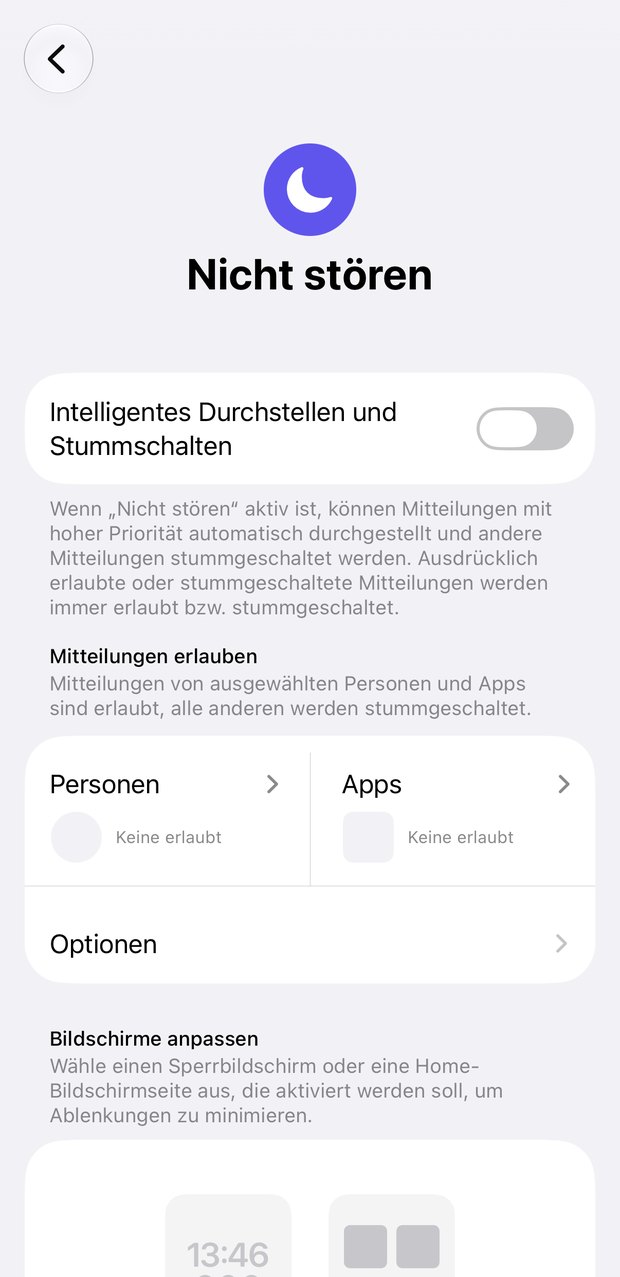
Apps wählenUnder “allow notifications from” — not people.
- d)09:41
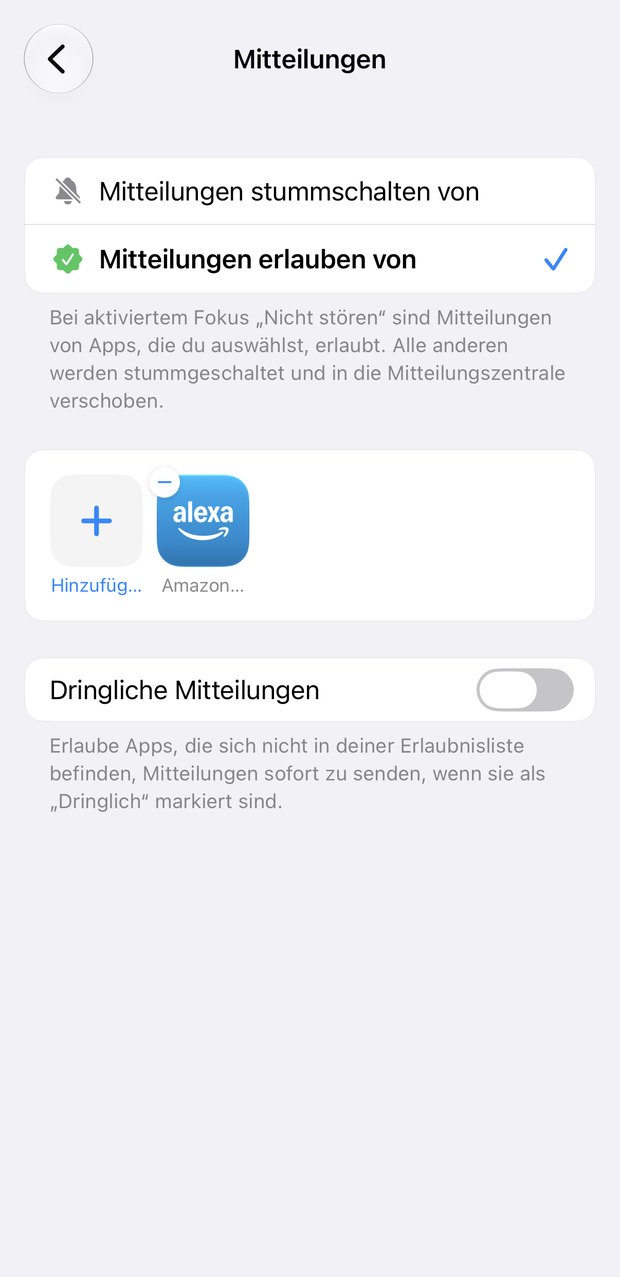
Alexa: add itAfter that it gets through even on Do Not Disturb.
In addition, allow the Alexa app’s notifications on the lock screen, with sound. Then test it: in the evening, with Do Not Disturb on, once in each direction — a call from the Echo to the phone and a Drop In from the phone onto the Echo. An alarm route that ends at a silent phone is not a route.
For the more adventurous: one shared account
The usual way is two separate Alexa accounts that have each other stored as contacts. We do it differently: my mother and I use one shared Alexa account, which I am also signed into on my phone .
The reason is control over Drop In. Through someone else’s account I land somewhere in her household — possibly in the wrong room. Through the shared account I see all of her Echos in my app and pick the device in the living room, in the kitchen or by the bed. So I am not only checking whether she is there, but where.
That is a lot of trust to extend, and it does not suit every family. In my experience, though, many family carers know the login details for half of their parents’ digital world anyway. Where the trust is already there, a shared account is no great hurdle any more: not the intended route, but a pragmatic one.
Who this is worth it for — and who it is not
A good fit
When the person being cared for can reliably speak, when someone they trust lives close enough to come round, when mobility or hand strength are limited, and as an addition to a home alarm that is already there.
Not enough
With a raised risk of falling, with advanced dementia, when nobody can come at short notice, or when there is no other safeguard at all. Then there is no way around a home alarm with a call centre.
In the end
Alexa does not replace a home alarm . But it does something a home alarm does not: communication without a threshold, in both directions, every day, not only in an emergency. It makes the thousand small points of friction smaller. And it is a second net for when the first one happens to be lying in the wrong place.
So the best answer is not either-or. Apply for the home alarm, because it is paid for and because in an emergency it closes the chain all the way to the ambulance. And set up Alexa alongside it, because it makes everyday life easier — and because if it comes to it, it is still there when the button is not.
At a glance
- No, not as a replacement. Alexa does not dial the emergency services, has no call centre and no fall detection.
- Yes, as a second channel. The person being cared for calls their family’s phone by voice; the family drops in onto the Echo in the room.
- One condition: Drop In only with a clear agreement, and only for one or two people you fully trust.
A parent lives alone, there was a fall or a moment when nobody could be reached — and there is already an Echo in the living room that can start calls. So why another device? The short answer: as a replacement for a home alarm system , Alexa is no good. The longer one: as a second channel in everyday care it is so good that we have been using it for exactly that for years — and as a safety net for when the alarm button happens to be in the next room.
What Alexa cannot do
A home alarm system is a button on the wrist, a base station with a backup battery, and a call centre staffed around the clock. Alexa has none of that:
- No official emergency call. Echo devices dial neither 112 nor 110 and reach only other Alexa users.
- No call centre. Every call ends with a family member who may not hear their phone.
- No fall detection. Someone who falls and can no longer speak triggers nothing.
- No power, no internet, no Alexa. If the router goes down, Alexa goes down.
Anyone who needs a home alarm should apply for one; from care level 1 upwards the German care insurance fund pays for it.
What Alexa is genuinely good at
I have cared for my mother, who has MS, for twenty years. Everyday care rarely consists of emergencies; it consists of many small questions, and each has its threshold: the phone in the other room, the hand too stiff for the keys. Those are exactly the thresholds Alexa lowers.
She can reach me. My mother says out loud that Alexa should call me, and that is all. The Alexa app rings on my phone, at night too, because I have made it an exception to Do Not Disturb. Because that is no longer a hurdle, she also calls about the small things.
I can reach her. Through Drop In from the Alexa app I am there on her living room Echo without her having to accept: “Mum, is everything all right?” No button, no movement — she simply answers.
This is not an emergency call, more a soft alarm: the fastest route for everything between “could you help me for a second?” and “I am not feeling well right now” — and incidentally something that works against loneliness.
The second safety net
Alarm buttons are not worn: they lie on the chest of drawers or in the bathroom, and when they are needed they are not on the body. Sometimes the strength to press the trigger is missing too.
A voice fails in different places than a thumb. Two systems that fail for different reasons are, together, considerably more reliable than either alone. Not instead of, but as well.
Privacy and trust
Drop In without a knock is a real intrusion: someone can listen in at any time, unannounced. Three rules apply with us:
- Only people you fully trust — one, at most two named people.
- Always in proportion. Drop In is for looking in on someone, not for checking up. For everything else there is the ordinary call.
- Both people have to be comfortable with it — as a question you ask again now and then. Anyone who feels watched will pull the plug sooner or later.
The technology does not distinguish between care and surveillance. Only the agreement does.
Setting it up, in brief
- Prepare both sides. An Echo with an Amazon account and stable Wi-Fi at the person being cared for, the Alexa app at the carer. Both with a verified phone number and each in the other’s address book.
- Switch on Drop In at the Echo, in the account of the person being cared for.
- Grant the permission to one person: only to the person they trust. Other contacts may call, but not listen in.
- Make the Alexa app an exception to Do Not Disturb, on the carer’s phone. Almost everybody forgets this step, and it decides whether a call at three in the morning arrives.
Then test it in both directions, in the evening with Do Not Disturb on. The full instructions with screenshots are in the full version.
Who this is worth it for — and who it is not
A good fit
When the person being cared for can reliably speak, when someone they trust lives nearby, and when mobility or hand strength are limited — as an addition to a home alarm .
Not enough
With a raised risk of falling, with advanced dementia, when nobody can come at short notice, or when there is no other safeguard. Then there is no way around a home alarm with a call centre.
In the end
Alexa does not replace a home alarm , but it does what one does not: communication without a threshold, in both directions, every day. So it is not either-or: apply for the home alarm, because in an emergency it closes the chain all the way to the ambulance — and set up Alexa alongside it, because it makes everyday life easier and is still there when the button is not.
News by email
New blog articles straight to your inbox. Now and then there is news about our products too – but not often, we promise. You can unsubscribe at any time.